
Open source / Local-first / macOS, Linux and Windows
Run every local workload from one control desk.
Porto is a local-first development control plane for native apps, containers, Compose stacks, Kubernetes clusters and Linux virtual machines. A Go daemon and CLI share state with a desktop app or a browser dashboard, so you can discover repositories, start workloads and inspect their data in one place.
- Running and ready
- Starting or needs attention
- Crashed or failing
Porto is not production-ready. Use it for local development and experimentation only. macOS apps are ad-hoc sealed, not Developer ID signed or notarized, and Windows installers are not code-signed, so your operating system may warn about or block installation or launch.
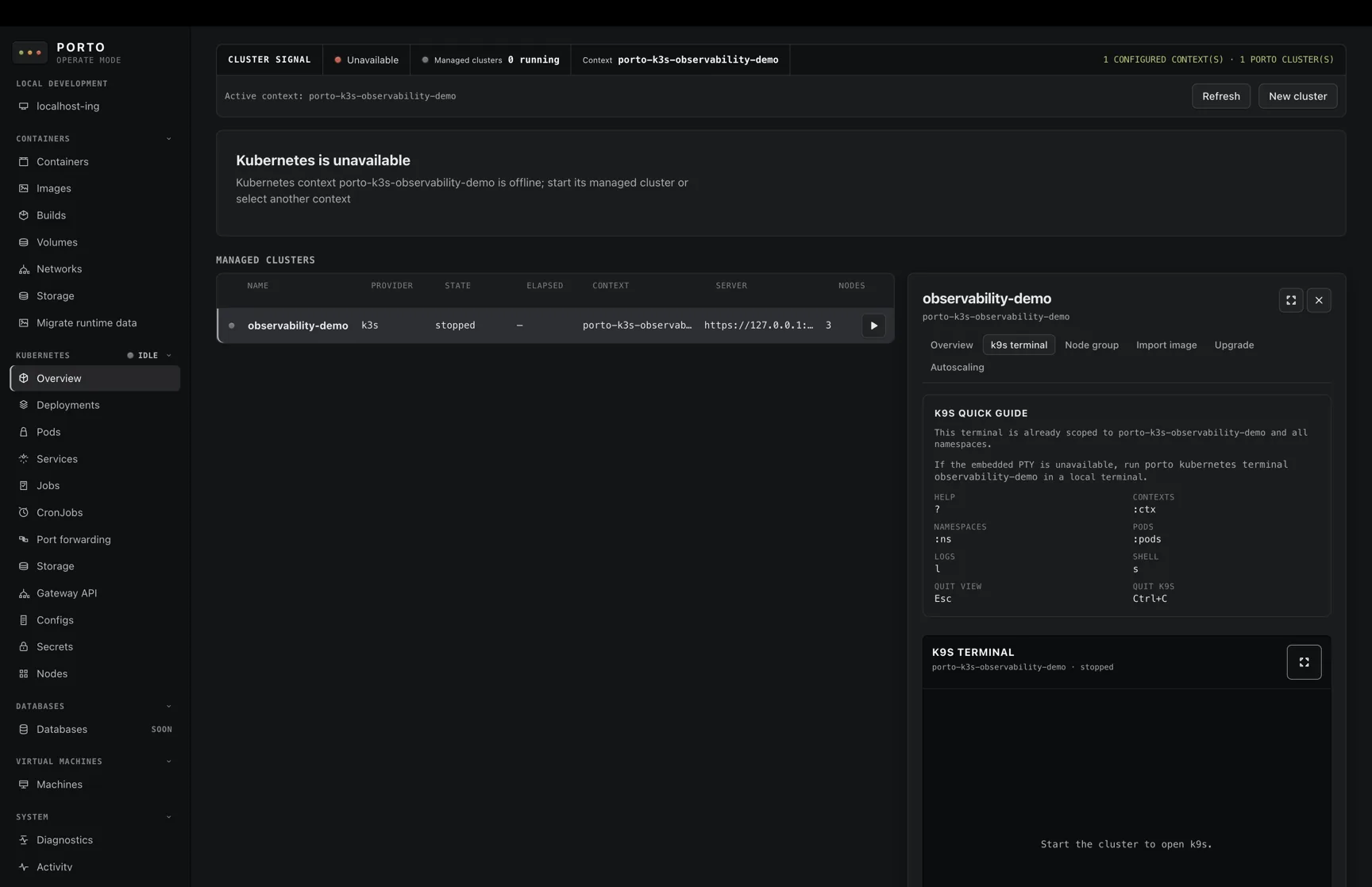
One rail, every runtime
What Porto runs
Porto works from each project's existing repository conventions and standard runtime formats. A project does not need a Porto-specific format.
-
Local development
Discover Make, Compose, Node.js, Python, Go and Rust projects. Porto installs dependencies before startup, assigns stable ports, waits for HTTP readiness and keeps stdout and stderr logs. Switch branches with automatic restarts, run concurrent branches in managed worktrees and open projects at local HTTP hostnames or trusted portless HTTPS.
-
Containers
Porto runs its own containerd backend with BuildKit instead of proxying another Docker engine. Use Docker, Compose and Buildx through the
portocontext, inspect layers with Dive, generate Syft SBOMs with Grype vulnerability matching, browse runtime files and create local volume backups. -
Kubernetes
Create k3s, k0s or kind clusters, or opt into Apple Cluster on Apple silicon, with scoped kubeconfigs and k9s terminals. Apply manifests, manage Helm releases, deliver with Flux or Argo CD, upgrade clusters, add bounded Karpenter workers and scale replicas with KEDA.
-
Virtual machines
Create Lima-backed Ubuntu, CentOS Stream, openSUSE, NixOS, Arch or Alpine machines, with snapshots where the provider supports them.
-
Environments
Enroll remote Porto hosts and outbound Edge agents, import an explicit Kubernetes identity and add verified extensions with scoped grants. Local access still needs no account.
-
System
Run health checks and create redacted diagnostic bundles, set owned-engine budgets, opt eligible HTTP apps into Resource Saver, and on Windows use selected WSL distributions or explicitly chosen native Windows containers.
Quickstart
Install and start
The installers select your OS and architecture, verify the release's SHA256SUMS, install for the current user, expose the CLI and launch Porto.
-
Install the desktop app
On macOS or Linux:
curl -fsSL https://raw.githubusercontent.com/porto-containers/porto/main/scripts/install-desktop.sh | shOn Windows PowerShell:
irm https://raw.githubusercontent.com/porto-containers/porto/main/scripts/install-desktop.ps1 | iexOn macOS and Linux, make sure
~/.local/binis on yourPATH. On Windows, open a new terminal afterwards. For a headless machine, download the CLI and web archive from the latest release and follow the manual archive steps. -
Check the daemon
The desktop app starts the daemon and prepares the container backend on first launch. For a CLI-only installation, run
porto daemon startin its own terminal first.porto version porto daemon statusporto daemon statusshould printrunning. The dashboard is athttp://127.0.0.1:37623. If startup fails, runporto diagnose. -
Discover projects
porto scan --depth 3 ~/code ~/work
porto list
Replace the roots with your workspace directories. Porto detects the first runnable strategy in each subtree.
-
Start a project
porto start api
porto logs api --stream stdout -n 100
porto stop api
Use a project name from
porto list. Running projects are also available athttp://<project>.porto.localhost:37680; runporto https installonce for trusted portless HTTPS.
x86-64 and ARM64
Platforms
| Platform | Desktop package | Runtime notes |
|---|---|---|
| macOS | DMG | Lima is bundled. Install QEMU with brew install qemu for snapshot-capable VMs. |
| Linux | Portable archive | The installer verifies QEMU and prepares a scoped desktop sandbox permission where AppArmor requires it. |
| Windows | EXE installer | Lima and QEMU are bundled. Native Windows containers are a separate opt-in. |
Desktop packages include the daemon, dashboard, Docker CLI, Compose, Buildx, Dive, Syft, Grype, Helm, kubectl, k9s, Lima and kind where supported. They do not need Go, Node.js or Docker Desktop.
Docker API 1.41 to 1.47
Use Docker as usual
Once the backend is ready, select Porto's Docker context:
docker context use porto
docker run --rm alpine:latest echo hello
docker ps --all
Compose projects work with docker compose up --detach. Check the compatibility matrix before relying on a workflow.
Agent skill
Hand it to your coding agent
The Porto agent skill teaches coding agents to install Porto, check the daemon and drive projects, containers, clusters and VMs through the porto CLI. Give your agent this prompt:
Read https://raw.githubusercontent.com/porto-containers/porto/main/.github/skills/porto/SKILL.md and follow it. If `porto version` fails, install Porto with PORTO_AGENT_SKILLS_DIR set to your personal skills directory; otherwise save that file as porto/SKILL.md in that directory. Make sure the daemon is running, then use the porto CLI for this task. Ask me before deleting anything or changing global Docker, HTTPS or Gatekeeper settings.Before you rely on it
Know the boundaries
Porto is primarily for one developer managing projects and services on a development machine, NAS or home system. Read the important limitations for the details.
- Local-first, not production management. The dashboard and API stay on loopback. Never expose the unauthenticated control interfaces through a network proxy.
- Bounded Docker compatibility. Docker API versions 1.41 through 1.47 are supported. Swarm and generic engine plugins are not.
- Opinionated discovery and readiness. Detection follows file and entry-point conventions, and readiness expects HTTP 200 on the selected port.
- Backups are not database-aware. Local volume copies are crash-consistent, not application-consistent database backups.
- Explicit analysis coverage. Partial, stale or failed image analysis never means zero vulnerabilities.
MIT licensed
Contribute
Report bugs or discuss changes in GitHub issues, or submit a focused pull request. When reporting a problem, include your OS, Porto version, reproduction steps and redacted diagnostics.
Build from source
Use a security-patched Go 1.27.3 or newer and Node.js 26 with npm.
git clone https://github.com/porto-containers/porto.git
cd porto
npm --prefix ui ci
npm --prefix ui run build
go build ./cmd/porto
Before opening a pull request, run go test ./... and npm --prefix ui run lint. The local validation guide covers the remaining checks.